Claude Skill
The Claude Skill helps you generate Jx components from natural language descriptions. It can be used in the Claude Web or in Claude Code.
Installation
Claude Web
Go to the Claude Skills page, click "+" > "Create a skill" -> "Upload a skill" and drag-and-drop the zip file downloaded from jx.scaletti.dev/skill.zip.
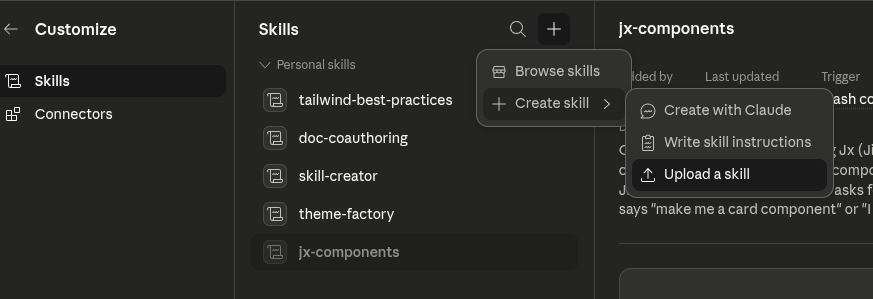
Claude Code
To install the skill, download it from jx.scaletti.dev/skill.zip and unzip it into your .claude/skills folder. If you don't have a skills folder, you must create one first.
Usage
Once installed, you can use the skill by invoking it in a conversation with Claude. For example, in Claude Code, you can type:
✦ ❯ claude
╭─── Claude Code v5.6.789 ───────────────────────────╮
│                                                    │
│                       ▐▛███▜▌                      │
│                      ▝▜█████▛▘                     │
│                        ▘▘ ▝▝                       │
╰────────────────────────────────────────────────────╯

❯  Create a Jx component that displays a user's profile card\
   with their name, avatar, and bio.

... ✨ Magic happens ✨ ...
Claude detects the skill from your prompt and uses its bundled knowledge of Jx idioms — explicit imports, typed props, attrs pass-through, per-component CSS/JS — to write the .jx file for you. You don't need to type a slash command or special prefix; just describe what you want.
What the skill knows
The skill covers two areas:
Authoring components: Buttons, cards, modals, dropdowns, forms, tables, layouts, navigation, accordions, toasts, and similar UI primitives. It follows a native-HTML-first, accessibility-first approach.
Library mechanics: How to set up a Catalog, register folders with prefixes, integrate with Flask / Django / FastAPI / htmx, etc.
Example prompts:
- "Build me a toast notification component with
success,error, andinfovariants and auto-dismiss after 5 seconds." - "Create a sidebar layout that collapses to a slide-in drawer on mobile."
- "Show me how to share a Flask
jinja_envwith a Jx Catalog." - "Why is
<Button {{ attrs.render() }} />not working when I forward attrs to a child component?" - "How do I run
jx checkin CI and fail the build on errors?"
You don't need to mention "Jx" explicitly in every message — once the skill is loaded, Claude keeps it active for follow-up turns in the same conversation.
Updating the skill
To pick up new versions of the skill, re-download skill.zip from jx.scaletti.dev/skill.zip and:
- Claude Web — go to the Skills page, delete the existing
jxskill, and re-upload the new zip. - Claude Code — replace the
.claude/skills/jx/folder with the new contents.
The skill is versioned alongside the docs, so each new Jx release ships an updated skill that reflects the current API.